To choose a HIPAA-compliant telehealth platform, focus on three essential factors: security, legal compliance, and usability. The right platform will protect patient data, meet HIPAA standards, and integrate smoothly into your practice. Here’s what you need to know:
- Security Features: Ensure the platform uses end-to-end encryption (E2EE), offers two-factor authentication (2FA), and includes access controls to safeguard patient information.
- Business Associate Agreement (BAA): A signed BAA is mandatory for HIPAA compliance, confirming the vendor’s responsibility to protect patient data.
- Integration and Features: Look for compatibility with your Electronic Health Records (EHR) system, secure communication tools (video, messaging, file sharing), and user-friendly interfaces.
- State and Federal Compliance: Verify that the platform aligns with local regulations, such as location verification and telehealth consent requirements.
- Cost and Support: Compare pricing models, ensure the platform fits your budget, and prioritize vendors with responsive customer support.
Key Tip: Test platforms with a small group before full implementation to identify potential issues and gather feedback.
Top 7 HIPAA Compliant Telehealth Platforms For Therapists
Security Features Required for HIPAA Compliance
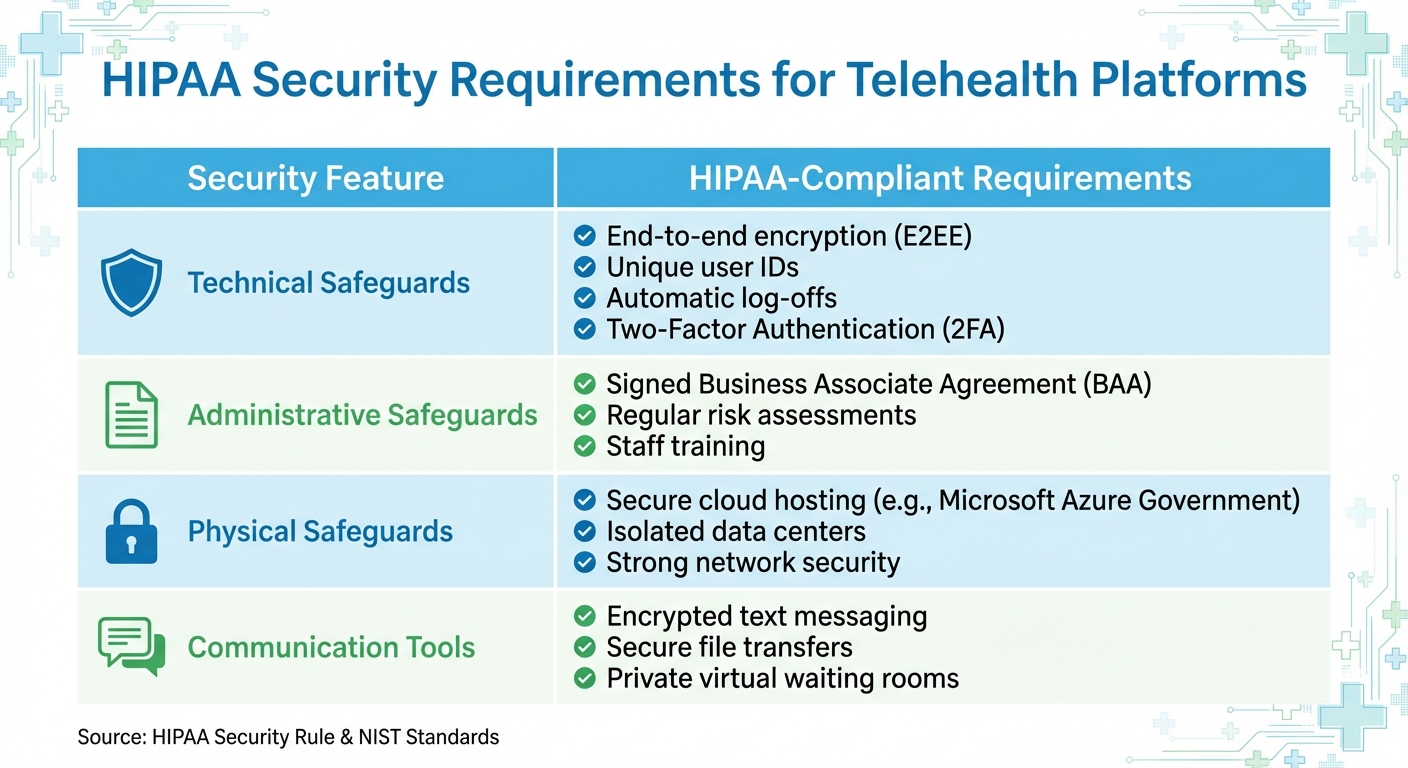
HIPAA-Compliant Telehealth Platform Security Requirements Comparison Table
When choosing a telehealth platform, there are three key security features that ensure HIPAA compliance. These safeguards – technical, administrative, and physical – work together to protect sensitive patient information from breaches, unauthorized access, and misuse. Here’s a closer look at these essential security measures, starting with encryption.
End-to-End Encryption
End-to-end encryption (E2EE) protects patient data both during transmission and while stored, making it accessible only to the intended provider and patient – even if intercepted. A compliant platform must secure data "in transit" (e.g., during video calls, chats, or file transfers) and "at rest" (e.g., when stored on servers or in the cloud). The HIPAA Security Rule mandates that encryption meet NIST standards [11]. Ensure that encryption applies to all communication tools, including text messaging, document sharing, and chat features – not just video calls.
EverHealth highlights the importance of robust encryption, noting their use of SSL AES 256-bit encryption (the highest commercially available standard), strict internal policies to maintain confidentiality, and digital certificates [11].
Avoid using consumer-grade platforms like standard Skype, Zoom, or conventional email for telehealth. These services often lack the always-on encryption required for HIPAA compliance [11].
Business Associate Agreement (BAA)
A Business Associate Agreement (BAA) is a legally required contract between your practice and the telehealth provider [1]. Without a signed BAA, it’s illegal to handle protected health information (PHI), even if the platform appears secure. The BAA ensures the vendor implements necessary safeguards – administrative, physical, and technical – to protect patient data. It must cover all platform functionalities you plan to use, such as video conferencing, messaging, file transfers, cloud recording, and appointment reminders [5].
HIPAA Video emphasizes the critical role of BAAs:
"As the cornerstone to HIPAA-compliant relationships, every HIPAA Video partner is guaranteed a HIPAA BAA Business Associate Agreement to maintain PHI security and overall HIPAA compliance" [10].
Always request a signed BAA before committing to a platform. Be wary of public-facing platforms like TikTok or Facebook Live, as they do not provide BAAs and cannot be used for telehealth purposes [2].
Access Controls and Authentication
In addition to legal agreements, strong access controls are critical for securing your telehealth platform. These measures ensure that only authorized users can access patient data or join telehealth sessions. At a minimum, the platform should offer Two-Factor Authentication (2FA) via SMS or email, unique user IDs for each staff member, role-based access permissions, automatic log-offs after inactivity, and regular password update reminders [10].
Additionally, platforms should include audit and monitoring tools to track staff activity and detect suspicious behavior [5]. To further safeguard data, secure the devices used to access the platform – like encrypting smartphones and laptops – to prevent exposure in case of loss or theft [3].
| Security Feature | HIPAA-Compliant Requirements |
|---|---|
| Technical Safeguards | End-to-end encryption (E2EE), unique user IDs, automatic log-offs, and Two-Factor Authentication (2FA) [10] |
| Administrative Safeguards | A signed Business Associate Agreement (BAA), regular risk assessments, and staff training [1] |
| Physical Safeguards | Secure cloud hosting (e.g., Microsoft Azure Government), isolated data centers, and strong network security [10] |
| Communication Tools | Encrypted text messaging, secure file transfers, and private virtual waiting rooms [5] |
Platform Usability and Features
A telehealth platform isn’t just about security – it also needs to function smoothly. A system that’s hard to navigate or creates technical headaches can derail your telehealth efforts. Here’s a breakdown of the key usability features that can make daily operations more efficient.
EHR System Integration
Your telehealth platform should work hand-in-hand with your Electronic Health Records (EHR) system. This integration eliminates redundant data entry and keeps patient information centralized. When your platform syncs with your EHR, details like session notes, billing codes, and appointment records automatically update in patient files, saving time and reducing errors. For practices like Growth and Change Counseling, where accurate documentation is critical for therapy sessions, couples counseling, and family therapy, this feature is invaluable.
For larger clinics, integration might require protocols like API, HL7, or FHIR to connect with enterprise systems such as Epic or Cerner. Be sure to test how well the platform writes data back to your EHR. Some systems only allow one-way data transfer, which can lead to fragmented records and inefficiencies.
Newer platforms often include AI-powered tools that simplify administrative tasks like drafting progress notes or creating treatment plans, potentially saving clinicians 5 to 10 hours a week [13]. Once your data flows seamlessly, the next step is ensuring robust communication tools are in place.
Secure Communication Tools
A good telehealth platform goes beyond video calls. It should offer a variety of secure communication options to meet different client needs. Key features to look for include:
- Encrypted text messaging and chat for quick updates between sessions
- Secure document sharing for forms, assessments, and other paperwork
- E-signature capabilities for consent forms and treatment agreements [5]
Virtual waiting rooms provide a professional touch, giving clients a secure space to wait until they’re admitted to their session – just like in a physical office. Automated reminders sent through secure channels can help cut down on no-shows while keeping sensitive information protected.
Browser-based platforms, like Doxy.me, make access easy by eliminating downloads, which can be a barrier for some users. These platforms maintain HIPAA compliance and offer Business Associate Agreements, even on free plans [14]. On the other hand, consumer apps like Skype, FaceTime, or WhatsApp, while encrypted, don’t sign Business Associate Agreements, making them unsuitable for clinical use.
State and Federal Compliance
If your practice serves clients across California, as Growth and Change Counseling does, your telehealth platform must align with state-specific regulations. For instance, verifying a client’s location during sessions is often a legal requirement [3]. Some platforms simplify this process with built-in location verification tools.
California also has distinct rules around telehealth consent, record-keeping, and reimbursement. You’ll need to document the session method, any technical issues, and the patient’s location to comply with state laws [3]. This is especially important for practices working with clients from various cities like Campbell, San Jose, Los Angeles, and Roseville, ensuring all legal requirements are met regardless of location.
sbb-itb-596b85d
How to Evaluate Telehealth Vendors
Once you’ve nailed down your practice’s technical and compliance needs, it’s time to start comparing telehealth vendors. Focus on strict security standards like encryption and Business Associate Agreements (BAAs), while also considering operational factors like pricing and support. Make a checklist of essential features and legal requirements to guide your decision-making process.
Vendor Feature Comparison
When it comes to security, certifications should top your list. Look for vendors with credentials like SOC 2 Type 2, HITRUST, FedRAMP, or NIST 800.171. These certifications show that the vendor has passed rigorous third-party security audits. Also, ensure the platform provides end-to-end encryption for audio and video, two-factor authentication (2FA), and administrative access controls to protect sensitive electronic protected health information (ePHI).
A signed BAA is non-negotiable. Some vendors offer BAAs even for free-tier users, while others limit this to paid healthcare plans [14]. Make sure to confirm this detail early on to avoid wasting time on platforms that don’t meet your legal compliance needs.
Beyond compliance, evaluate the platform’s workflow features. Look for tools like virtual waiting rooms, patient queuing, and support for multi-participant sessions. For practices offering family or couples counseling, like Growth and Change Counseling, the ability to add multiple participants to a session is crucial. Additionally, check if the platform supports white-labeling so your practice branding is visible throughout the client experience. It’s also worth verifying whether administrative staff can access the system without requiring paid licenses [5].
| Criteria | HIPAA Requirement | Practice Consideration |
|---|---|---|
| Encryption | End-to-end for audio/video | High-definition quality for clear communication |
| Access Control | 2FA and unique user IDs | Administrative oversight roles |
| Legal | Signed BAA | Month-to-month vs. annual contract |
| Integration | Secure data transfer | EHR compatibility and payment processing |
| Workflow | Audit logs and reporting | Waiting rooms, patient queuing, session recording |
| Communication | Secure messaging and file sharing | Screen sharing for assessments or treatment plans |
Cost and Support Assessment
Once you’ve confirmed the platform meets your feature and compliance needs, it’s time to evaluate pricing and support. Telehealth platforms typically charge anywhere from $50 to $200 per month [5]. Many vendors offer bundled packages that include HIPAA compliance, BAAs, and full feature sets. Pay close attention to the pricing structure – some charge per user, while others offer free accounts for administrative roles [5]. If your practice operates across multiple locations, like Growth and Change Counseling with offices in Campbell, San Jose, Los Angeles, and Roseville, check whether the pricing scales with the number of locations or stays consistent.
Contract flexibility is another key factor. Month-to-month contracts allow you to test the platform without committing to a long-term financial obligation. This flexibility is particularly helpful when determining whether the platform truly fits your workflow [5]. Before signing up, ask the vendor for a needs-based assessment to ensure you’re not paying for features your practice doesn’t require [5].
Lastly, don’t overlook the importance of technical support. A vendor with responsive live support and staff training can make a huge difference in your telehealth experience. Confirm that the vendor includes regular updates for antivirus and firewall protection as part of their support package [9]. User reviews often emphasize the value of strong support, like this one:
I am thrilled with how robust and simple the system is… Best by far of any platform I’ve tried! [10]
Test the vendor’s support responsiveness during your trial period. Reach out with technical questions and see how quickly and thoroughly they respond. This will give you a clear idea of what to expect if you need urgent help during a live session. Reliable support is the backbone of a secure and user-friendly telehealth platform.
Platform Implementation Steps
When you’ve chosen a vendor, the next step is rolling out the platform effectively. A successful implementation requires careful planning to ensure your team understands the technology and follows HIPAA compliance protocols. Prioritize encryption, access controls, and BAA requirements throughout the process. Rushing this phase can lead to security vulnerabilities or leave staff feeling unprepared to handle the platform during live sessions. With the right approach, your practice can transition smoothly from setup to daily operations.
Staff Training and Onboarding
Start by appointing a HIPAA Compliance Officer to oversee training and establish clear guidelines for handling Protected Health Information (PHI) [8][11]. This person will serve as the main resource for staff questions about secure data sharing or unusual scenarios during telehealth sessions.
Your training program should focus on three key areas. First, teach staff how to safeguard PHI, especially since insider access is linked to 93% of reported security incidents [15]. Second, emphasize cybersecurity fundamentals like spotting phishing attempts, using strong passwords, and securing mobile devices by locking screens and updating software regularly [15][11]. Third, introduce clinical protocols for virtual care, such as verifying patient identity at the start of each session and documenting everyone present during the call [7][9].
For practices offering family or couples counseling, identity verification becomes even more crucial. Also, stress the importance of maintaining privacy during sessions. Staff should work in private spaces with closed doors and ask patients to confirm who might be within earshot on their end [7].
Provide staff with written or video training materials they can revisit as needed [11]. Configure the platform to log users out after two minutes of inactivity to prevent unauthorized access [8]. Administrative staff should be trained to manage user roles, ensuring team members only access the PHI necessary for their specific responsibilities [8][11]. If your practice operates in states like California, make sure training includes state-specific telehealth regulations alongside federal HIPAA standards, as seen with practices like Growth and Change Counseling.
Testing and Client Feedback
Once staff training is complete, thoroughly test the platform to ensure a smooth implementation. Before launching telehealth services to your full client base, conduct a pilot test with a small group of staff and clients. This helps identify technical issues and usability challenges [12]. Testing should confirm the platform’s security features, such as end-to-end encryption, two-factor authentication, and administrative access controls, as well as its integration with existing EHR systems [10][9].
Simulate the complete virtual care workflow, from patient identification and the waiting room experience to triage, assessments, and encounter note documentation [9]. Practices offering couples counseling, like The Marriage Rescue Institute, should test multi-party sessions to ensure they run smoothly [5][4]. Verify that HIPAA-compliant documents can be signed and stored seamlessly within the platform [5].
Gather feedback on technical performance during testing. Ask clients about audio and video quality, as issues like blurry visuals or sound disruptions can greatly impact the experience [17]. With 96% of Americans owning a communication device [10], most clients already have the necessary hardware. However, you may need to provide guidance on browser compatibility or internet requirements. Test the platform on various devices – including smartphones, tablets, and PCs – to ensure easy access without requiring complex software downloads [10][5].
Establish a feedback loop during the initial rollout. Encourage clients to share input on accessibility features, such as screen readers or closed captioning [6]. Monitor technical complaints or adverse events during this phase and use the findings to refine your training materials [9].
One user shared their experience with a platform, saying:
I am thrilled with how robust and simple the system is, and with the clarity of both the video and the audio transmission. Best by far of any platform I’ve tried! – Susan Blum, LCSW [10]
Finally, allocate sufficient funds for professional training to help staff fully master the system [17]. Plan to invest 15–20% of your initial setup costs annually for updates and improvements based on user feedback [16][18].
Conclusion
Finalizing your choice of a telehealth platform means balancing security, usability, and cost to ensure your practice is protected and efficient. A critical first step is confirming that the vendor offers a Business Associate Agreement (BAA) – this is a must-have to avoid severe federal penalties when handling patient data. Additionally, the platform should include end-to-end encryption for data at rest and in transit, as well as two-factor authentication for secure access.
Look for platforms that integrate smoothly into your existing workflows. Features like EHR compatibility, secure messaging, and intuitive interfaces across devices can make a significant difference in day-to-day operations. As Cara H. Staus, Assistant Vice President of Risk Management Group at AWAC Services Company, explains:
Utilizing HIPAA-compliant technology will protect patient privacy and safeguard your practice in the event of a cyber-related attack [3].
For practices like Growth and Change Counseling, which provides telehealth services across California, the right platform supports a range of services – from individual therapy to structured programs like The Marriage Rescue Institute’s 12-week couples coaching process.
Before fully rolling out a platform, conduct pilot tests with staff and a small group of clients. This step helps uncover technical issues and provides feedback on key aspects like audio quality, video clarity, and accessibility. Document protocols for verifying patient identity and ensure your team is well-trained on maintaining privacy during virtual sessions.
Effective onboarding and reliable vendor support are also essential for maintaining compliance and ensuring smooth operations. With the telehealth market poised for significant growth [4], investing in secure and accessible technology not only removes barriers to care but also strengthens trust with your clients.
Final Thoughts on Secure Telehealth for Growth and Change Counseling
What security features should a HIPAA-compliant telehealth platform have?
To meet HIPAA requirements, a telehealth platform needs to have some key security measures in place. These include end-to-end encryption for video and data, HTTPS-secured connections, and a secure way to transmit protected health information (PHI) – like using encrypted emails or a secure portal.
On top of that, the platform provider must sign a Business Associate Agreement (BAA), which confirms their responsibility to protect sensitive patient information.
These safeguards aren’t optional – they’re essential for ensuring patient privacy and staying compliant with HIPAA regulations.
Why is a Business Associate Agreement (BAA) important for HIPAA-compliant telehealth platforms?
A Business Associate Agreement (BAA) plays a key role in ensuring HIPAA compliance for telehealth platforms. It’s a legally binding contract between your healthcare practice and the platform (referred to as the business associate), requiring them to handle sensitive patient data in accordance with HIPAA’s privacy and security regulations.
The BAA outlines specific responsibilities, including how Protected Health Information (PHI) is safeguarded, procedures for breach notifications, and adherence to compliance standards. Without a signed BAA, even the most secure telehealth platform could expose your practice to serious legal and financial consequences.
How do I make sure my telehealth platform works seamlessly with my EHR system?
To create a seamless connection between your telehealth platform and EHR system, start by pinpointing the exact workflows and data – such as visit notes or lab results – that need to be synchronized. Check with the vendor to see if their platform supports widely-used standards like HL7 or FHIR, and ask about customization options to meet your specific needs.
It’s also crucial to talk through key details like costs, timelines, and how future updates might affect the integration. Running a small pilot program is a smart way to test whether scheduling, documentation, and billing processes function as expected. Lastly, confirm the vendor provides ongoing support and that the integration plan includes HIPAA-compliant safeguards, such as a Business Associate Agreement (BAA).
Related Blog Posts
- Ultimate Guide to Virtual Therapy for Addicted Couples
- Managing Boundaries in Addiction Recovery Telehealth
- Best Practices for Multicultural Telehealth Counseling
- Zoom vs. HIPAA-Compliant Platforms for Therapy
