Balancing remote work and supervising your child’s media use can feel overwhelming. But with the right strategies, you can manage both effectively. Here’s what works:
- Structured Schedules: Sync work with your child’s natural rhythms. Use visual cues like headphones to set boundaries.
- Dedicated Workspaces: Create a clear work zone, even if it’s just a desk or corner, to separate work from family life.
- Parental Modeling: Show healthy screen habits and set clear media rules. Use tools like Google Family Link for device management.
- Flexible Childcare: Have backup plans, like a babysitter or online tutor, for high-focus work periods.
- Balanced Screen Time: Focus on how and why screens are used. Use the 3-Zone Approach: Focus (educational), Social (interactive), and Rest (entertainment).
Key takeaway: Combine these strategies to create a system that suits your family’s needs and adjust as your child grows. If burnout or emotional struggles arise, consider professional support.
How to Work From Home with Kids and Stay Productive
sbb-itb-596b85d
1. Structured Scheduling and Boundary-Setting
Structured scheduling involves syncing your work tasks with your child’s natural daily rhythms. Instead of sticking to a rigid 9-to-5 schedule, align your most focused work – like meetings or deep-thinking tasks – during quieter moments, such as nap times, early mornings, or quiet play periods. Reserve less demanding tasks, like answering emails or organizing files, for times when your child may need more of your attention. By time-blocking in this way, you can make the most of your day while establishing clear signals for when you’re working.
Using visual cues is another effective way to set boundaries. For example, wearing noise-canceling headphones can signal to your child that you’re not to be interrupted unless it’s an emergency. This tangible method works especially well with younger children who may not fully understand verbal explanations like "I need to focus right now."
Implementation Complexity
Starting a structured schedule takes patience and consistency. Teach your kids to recognize and respect visual cues by reinforcing them over time – this could take a few weeks. Instead of sticking to rigid time intervals, try flexible blocks of 15 to 45 minutes, adjusting based on your child’s energy levels. Adding buffer time to your schedule can also help you navigate unexpected interruptions without derailing your day.
Age-Appropriateness
This approach can be tailored to suit different age groups. For infants (0–12 months), having a portable "grab-and-go" work kit allows you to seize small windows of opportunity during unpredictable nap times. Toddlers (1–3 years) benefit from a childproofed workspace and consistent quiet-time routines, paired with engaging activities to keep them occupied. For school-age children, tools like color-coded calendars and designated workstations can encourage independence. The beauty of this system is its ability to grow and evolve as your child develops better self-regulation skills.
Potential Challenges
One of the biggest hurdles in balancing remote work and parenting is maintaining boundaries. When your home doubles as your office, it’s easy for work to spill into family time, leading to fatigue and burnout. To combat this, consider using digital wellness tools that silence work notifications after hours, helping you protect your evenings for family. Flexibility is also key – parenting is unpredictable, and even the best schedules may need to bend to accommodate the unexpected.
2. Designated Workspaces with Environmental Controls
Setting up a dedicated workspace, separate from family areas, helps establish clear boundaries between work and home life. It doesn’t have to be elaborate – a corner, desk, or even a cupboard can work. The key is consistency, which reinforces that this spot is strictly for work. This visual separation pairs well with structured scheduling to signal when it’s time to focus.
Jennifer Campbell, a doula and virtual assistant, successfully ran her home-based business for nine years while homeschooling and caring for her grandchildren. She converted a spare bedroom into a workspace designed with child-safe elements. As she put it:
"Having a dedicated workspace is vital… it signals to children that this area is for work purposes." – Jennifer Campbell, Doula and Remote Worker
Making It Work
Start by childproofing the area – cover outlets and use safety gates to create boundaries. If you’re working in a shared space, a safety gate around your desk can define your work zone while providing a secure play area for your kids. For smaller homes or RVs, dedicating a specific cupboard for work supplies can help separate work from daily living.
Adjusting for Different Ages
This approach can be adapted for children of all ages. For infants and toddlers, physical barriers like high shelving allow you to supervise while keeping work items out of reach. A pack-and-play or a small toy box in your workspace can help keep them entertained nearby.
For school-age children (6–12 years), visual cues work well. Something as simple as wearing noise-canceling headphones or hanging a colored sign on your door can indicate that you’re in focus mode. Goodordering offers a helpful tip:
"When mommy has headphones on, wait unless it’s an emergency." – Goodordering
With older children and teens, placing devices in a shared area near your workspace can allow for passive supervision while still granting them independence.
Overcoming Challenges
Space limitations in smaller homes can make it tricky to carve out a dedicated workspace. Strategic furniture placement – like bookshelves or room dividers – can help create visual boundaries. It’s normal for children to test these boundaries at first, so consistency is key during the adjustment period.
For parents with unpredictable schedules, having a grab-and-go kit (complete with a charged laptop and necessary documents) can help you quickly relocate your work setup if your child’s routine suddenly shifts.
3. Parental Modeling and Media Plan Development
After setting boundaries and managing the home environment, the next step in creating a balanced digital life is parental modeling and developing a clear media plan. Kids often mirror what they see rather than what they’re told. If you’re glued to your phone during dinner or answering work emails late at night, you’re unintentionally showing that digital boundaries don’t matter. Simple actions, like closing your laptop when your child speaks, send a powerful message about prioritizing personal connections. These daily habits naturally pave the way for a structured media plan.
A media plan lays out clear, written rules that balance uninterrupted work time with meaningful family interactions. Instead of vague guidelines, aim for specifics: allow gaming only after homework is done, encourage educational apps during work hours, and limit platforms like YouTube. Remote work expert Alexandra Samuel explained:
"We made a lot more progress on screen time once we stopped looking for buy-in, stopped negotiating, and stopped trying to justify our rules to the kids" [5].
Write these rules down, and be prepared to adjust them as new challenges arise.
Implementation Complexity
Start small with simple visual cues before diving into digital tools. For example, hang a colored sign on your door or wear distinct headphones to signal focus time to younger kids. Once these habits are in place, leverage tools like Google Calendar for color-coded schedules. For more control, you can try free apps like Google Family Link or iOS Screen Time to manage device usage. While setting up these tools can feel tedious – especially when closing loopholes – the system becomes easier to maintain over time.
Age-Appropriateness
Adjust your approach based on your child’s age for better results. For toddlers, model "quiet time" by working silently while they use educational tablets. At this stage, your presence matters more than direct interaction. School-age children (6–12 years) benefit from hearing you clearly state boundaries, such as, "I’m putting my phone away for dinner now", to help them understand limits on digital availability. For teens, use your own work habits as teaching moments – show them how you manage projects in Google Docs or organize schedules. This not only reinforces boundaries but also demonstrates practical skills they can use.
Potential Challenges
One major challenge is the risk of blurred boundaries, where work starts to invade every aspect of life, leading to burnout. Signs like headaches or disrupted sleep may indicate that digital boundaries need reinforcing. To address this, use screen time trackers on your own devices to ensure work doesn’t spill into family time. Resistance from kids is also common – protect fragile items during outbursts and, if needed, consider short-term childcare support ($20–$30 per hour) during particularly challenging transitions [5].
4. Flexible Childcare Integration
Remote work can be unpredictable, even with well-planned boundaries. That’s why having a backup childcare plan is so important. Whether it’s a partner, a neighbor, or a professional caregiver, creating a support network ensures you can handle those high-pressure meetings or tight deadlines without interruptions. This approach works hand-in-hand with structured schedules and dedicated workspaces to help you stay productive.
Implementation Complexity
Flexible childcare integration builds on earlier strategies by adding an extra layer of support. A simple but effective tip is to create a grab-and-go kit for your child and use clear visual signals, like a specific hat or a colored sign, to indicate when you’re unavailable. For older kids, consider hiring an online tutor to keep them engaged during critical work hours. While setting this up may take some effort initially, it can lead to smoother day-to-day operations.
Cost Considerations
If professional childcare is an option, investing a few hours per week can make a big difference. You can also look into grants or free educational apps to help reduce costs. Jennifer Campbell, a certified birth doula, emphasizes the importance of knowing your limits and seeking help:
"Knowing your limitations and gaining support makes working – work well." [1]
Effectiveness for Different Work Types
The key is to match your childcare plan to your work needs. For tasks requiring deep focus, try scheduling them during your child’s quiet moments. Save less demanding tasks for periods when you might need to supervise. And always have a backup plan for those unexpected video calls.
Age-Appropriateness
Your childcare strategy should align with your child’s developmental stage:
- Infants (0–12 months): Take advantage of nap times, even if they’re unpredictable.
- Toddlers (1–3 years): Establish a daily “quiet time” routine in a safe, childproofed area.
- Elementary-age kids (6–11 years): Online tutoring or chore-for-screen-time systems can work well.
- Teens (12+ years): Set clear boundaries through negotiation, encouraging their independence while respecting your work needs.
Potential Challenges
It’s easy for work-life boundaries to blur, leading to burnout symptoms like fatigue or irritability. One way to avoid this is by discussing flexible hours with your employer. As Goodordering aptly put it:
"The chaos of answering emails while your toddler dismantles the living room isn’t sustainable." [2]
5. Balanced Screen Time Management with Alternative Activities
Managing screen time isn’t just about tracking hours – it’s about understanding why and how your child uses devices. The 3-Zone Approach breaks screen use into three categories: Focus (educational apps or creative projects), Social (video calls or collaborative games), and Rest (passive entertainment like watching cartoons). By setting specific guidelines for each zone, you can help your child make better choices without feeling the need to hover over them constantly.
A simple way to start is to ask your child what they plan to do before handing over a device. This encourages them to think critically about their screen use. As Mipaoverseas wisely put it:
"Screen time isn’t just minutes anymore; context and content matter." [3]
Implementation Complexity
Adding structure to screen time management doesn’t have to be overwhelming. Start small – like establishing a no-screens-at-meals rule – before introducing the full 3-zone system. For younger kids, visual cues can be a helpful tool to show when screens are allowed or off-limits.
Another idea? Incorporate micro-breaks into your day. For instance, after 20 minutes of focused work, encourage your child to take a 10-minute, non-screen activity break. This not only keeps them engaged but also aligns with your own work schedule. [3]
Cost Considerations
You don’t need to spend much to keep kids entertained away from screens. Activities like puzzles, magnet boards, or even cooking together can be fun, low-cost options that double as quality bonding time. [2] [4] If you’re open to spending a bit more, premium educational apps (typically $5–$15 per month) can be a worthwhile investment to keep learning engaging.
Age-Appropriateness
Different ages call for different approaches. For elementary-aged kids (6–11), creative digital tools like coding apps or digital storytelling can be particularly effective, especially if you pair them with a “chores-for-screen” system. [3]
Teens (12+) require a different strategy. Instead of strict rules, try negotiating boundaries that respect their need for independence. Focus on privacy awareness and set clear consequences rather than outright bans. For all ages, consider tech-free times – like specific evenings or weekend mornings – where everyone in the family unplugs. These moments not only reduce screen reliance but also create opportunities for shared experiences, even amidst the chaos of remote work. [3]
Potential Challenges
Inconsistent routines can wear everyone out. Establishing structured routines for homework, chores, and play can cut down on constant debates. When your work gets hectic, try syncing your deep-focus tasks with your child’s natural quiet periods or their “Focus” zone. Save less demanding tasks for when they’re in “Social” or “Rest” modes.
As Mipaoverseas pointed out:
"Parents who focus on purpose and balance get better outcomes than those who only count minutes." [3]
This thoughtful approach to screen time management can ease the challenges of juggling parenting and remote work, helping you find a rhythm that works for the entire family.
Pros and Cons Comparison
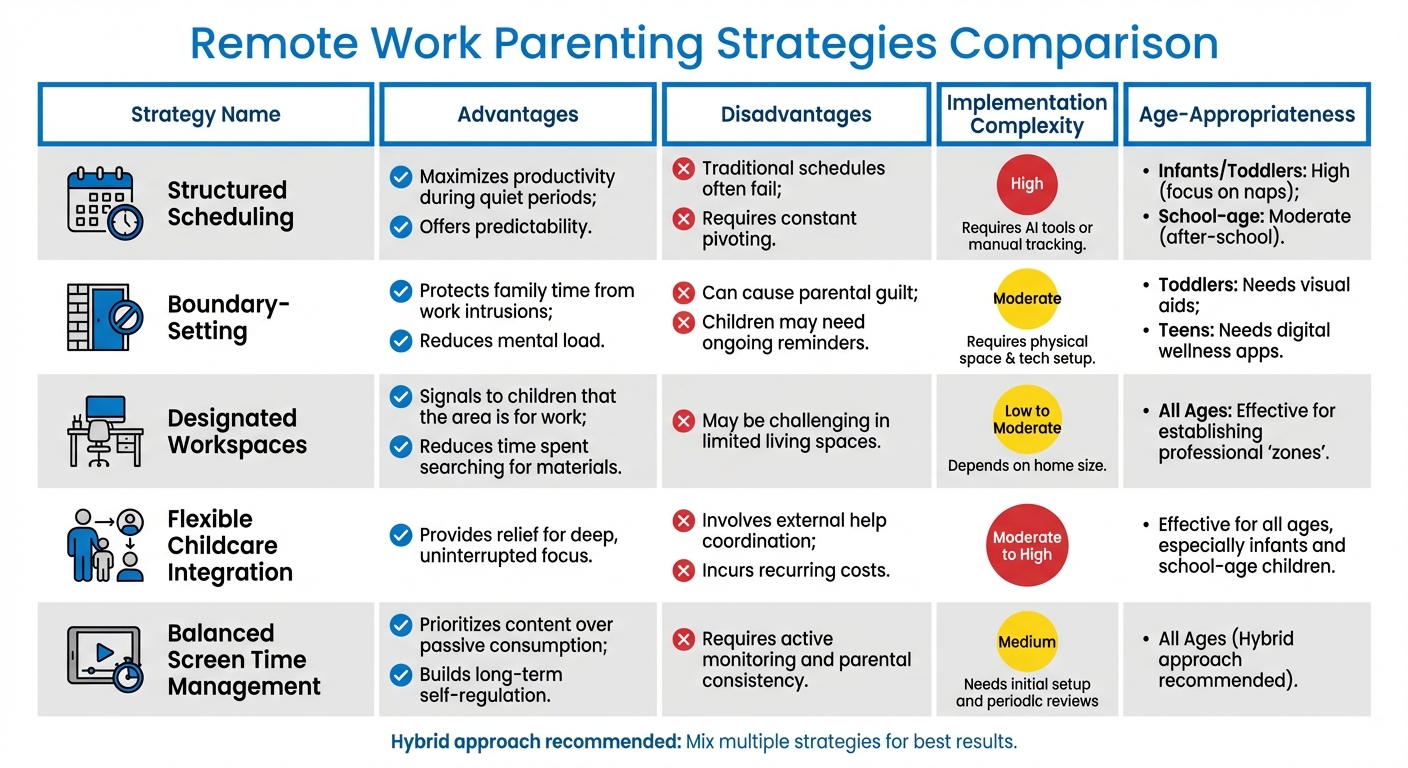
Comparison of 5 Remote Work Parenting Strategies: Pros, Cons, and Implementation
Let’s break down the pros and cons of different parenting strategies to help you balance remote work and media supervision in a way that fits your family’s needs.
Structured Scheduling is a great option when you align your work with your child’s natural rhythms. For example, you might tackle high-focus tasks during nap times for infants or quiet hours for older kids. The challenge? Traditional 9-to-5 schedules don’t always match up with family life, meaning you’ll likely need to adjust for unexpected interruptions like sick days. As Jennifer Campbell, a doula and remote work expert, explains:
"A well-planned schedule helps in setting clear boundaries between work and family time, ensuring neither aspect of life is neglected." [1]
However, this strategy can be demanding to implement, requiring tools or manual tracking to stay on top of things.
Boundary-Setting helps protect family time by using physical and digital cues – think setting up a dedicated workspace or using tools to silence notifications after hours. But this method isn’t foolproof. Younger kids may need constant reminders, and parents might feel guilty about being physically present but not fully engaged. Adding visual aids for toddlers or digital wellness apps for teens can make this approach easier but slightly more complex. [2]
Flexible Childcare Integration brings in external support, whether it’s hiring a caregiver, using an online tutor, or coordinating with a partner or neighbor. The downside? Costs. While workspace upgrades like safety gates or noise-canceling headphones are usually one-time expenses, professional childcare often comes with ongoing fees. [2]
Here’s a quick comparison to see how these strategies stack up for remote work and media supervision:
| Strategy | Advantages | Disadvantages | Implementation Complexity | Age-Appropriateness |
|---|---|---|---|---|
| Structured Scheduling | Maximizes productivity during quiet periods; offers predictability [2] | Traditional schedules often fail; requires constant pivoting [2] | High (Requires AI tools or manual tracking) | Infants/Toddlers: High (focus on naps). School-age: Moderate (after-school) |
| Boundary-Setting | Protects family time from work intrusions; reduces mental load [2] | Can cause parental guilt; children may need ongoing reminders [2] | Moderate (Requires physical space & tech setup) | Toddlers: Needs visual aids. Teens: Needs digital wellness apps [2] |
| Designated Workspaces | Signals to children that the area is for work; reduces time spent searching for materials [1] | May be challenging in limited living spaces [1] | Low to Moderate (Depends on home size) | All Ages: Effective for establishing professional "zones" [1] |
| Flexible Childcare Integration | Provides relief for deep, uninterrupted focus [2] | Involves external help coordination; incurs recurring costs [2] | Moderate to High | Effective for all ages, especially infants and school-age children [2] |
| Balanced Screen Time Management | Prioritizes content over passive consumption; builds long-term self-regulation [3] | Requires active monitoring and parental consistency [3] | Medium (Needs initial setup and periodic reviews) | All Ages (Hybrid approach recommended) |
A hybrid approach – mixing parental control tools with active coaching and family agreements – often works best. It combines immediate enforcement of boundaries with teaching long-term self-regulation. While this method requires regular time and effort, it strikes a balance that suits many families. [3]
When to Seek Professional Support
Trying to juggle remote work and keeping an eye on media use can push parents to their breaking point. If you’re noticing emotional struggles like persistent sadness or frequent crying, or physical issues such as constant fatigue, headaches, appetite changes, or trouble sleeping, these could be early signs of burnout[2].
When these symptoms linger for more than two months and disrupt your ability to function day-to-day, it’s time to consider seeking professional help[6]. Rachelle Bloksberg, MA, LMFT, emphasizes this point:
"If you have been suffering from depression for more than 2 months, and it has interfered with your ability to function in your everyday life, it is time to get help."[6]
This advice underlines the importance of identifying and addressing these warning signs early.
Another red flag is what experts call the "red zone." This is when you feel so overwhelmed you might give in to your child’s screen-time demands or find yourself consumed by frustration. Jaclyn Long, Founder & Director of Mindful Child & Family Therapy, explains:
"By letting your child offload their tension, hurt, anger, and frustration onto you, you are creating an emotionally safe space for them to express their emotions… this might be nearly impossible to implement this without a lot of guidance and support from a professional therapist or parent educator."[7]
Reaching this point often signals that outside support is essential to regain balance.
For families in California, Growth and Change Counseling offers practical solutions like parent coaching and telehealth services statewide. Telehealth makes it easy to schedule sessions – no babysitter needed and no travel time – whether during lunch breaks or from any private space. They also provide a free 15-minute consultation to see if their solution-focused approach aligns with your family’s needs. Plus, they accept health insurance and offer clear cost estimates, making the process more accessible.
Conclusion
There’s no one-size-fits-all solution for families juggling remote work and media supervision. The key is finding a balance that aligns with your household’s unique rhythm, your kids’ ages, and the demands of your job. For some, structured schedules and dedicated workspaces work wonders. For others, a more flexible approach paired with hybrid media management feels right. These strategies complement earlier advice about seeking professional help if warning signs appear.
Many parents find success by mixing different methods – like using parental control apps for younger kids while crafting media agreements with teens. Others combine environmental adjustments with flexible childcare options during critical work hours.
If your current setup starts to feel unsustainable, it might be time to explore new options. This could mean hiring an online tutor for a few hours a week, negotiating flexible hours with your employer, or consulting a professional parenting coach.
As life evolves – whether it’s your children growing older or your work demands shifting – adjusting your approach is crucial. What worked during your toddler’s naptime won’t cut it when they’re in school. Regular family check-ins can help you spot when it’s time to make changes, ensuring your strategies keep pace with your family’s needs.
Finding Your Family Balance with Growth and Change Counseling
How do I build a work schedule that fits my child’s routine?
To craft a work schedule that fits your child’s routine, prioritize flexibility. Plan your tasks around key moments like their naps, meals, or playtimes. Break larger tasks into smaller chunks that you can tackle during these windows. Be sure to take regular breaks to attend to their needs, and keep your family in the loop about your schedule. As their routine evolves, make adjustments to maintain a balance between work responsibilities and supervising your child.
What can I do if I don’t have space for a home office?
If you don’t have room for a dedicated home office, carve out a work zone in a shared area like a corner of your living room. Foldable furniture can be a smart way to define the space without taking up too much room. Use vertical storage solutions, such as shelves or wall-mounted organizers, to keep your work essentials within reach and neatly arranged. Setting clear boundaries with family about your work hours can also reduce distractions and help you stay focused, even in a smaller space.
How can I manage screen time without constant battles?
Setting clear, age-appropriate boundaries for screen time is essential, and how you communicate these limits matters just as much. Stay calm and consistent when discussing the rules. Tools like visual timers or charts can be a big help, giving kids a clear sense of how long they can use their screens.
Consistency is your best friend here – stick to the rules without turning it into a battle. To keep things balanced, encourage other activities like playing outside, diving into a good book, or enjoying family games together. Also, consider creating media-free moments, such as during meals or the hour leading up to bedtime. These breaks can help establish healthier habits and keep conflicts to a minimum.
Related Blog Posts
- Screen Time vs. Family Time: Finding Balance
- Parenting in High-Stress Situations: Co-Parenting Tips
- Screen Time vs. Family Time
- Understanding Digital Burnout in Neurodiverse Kids
